Pretext: The 20K-Star JavaScript Library Everyone Is Using Wrong
Pretext is a fast, accurate JS/TS library for multiline text measurement that eliminates DOM layout reflow. Learn how prepare() and layout() unlock virtual scrolling, masonry grids, and chat UIs — without sacrificing accessibility.

Pretext: The JavaScript Library Taking the Web by Storm (And Most People Are Missing the Point)
~7,000 GitHub stars in 72 hours. Nearly 20K and counting. A dragon parting text like water went viral. But the real story? Nobody’s talking about it.
First, What Even Is Pretext?
Pretext is a pure JavaScript/TypeScript library for multiline text measurement and layout — built by Cheng Lou, the same person behind react-motion and ReasonML.
Its core promise, straight from the README:
“Pretext side-steps the need for DOM measurements (e.g.
getBoundingClientRect,offsetHeight), which trigger layout reflow, one of the most expensive operations in the browser.”
That’s it. That’s the whole thing. And it’s enormous.
Install it in seconds:
npm install @chenglou/pretextThe Problem It Solves: Layout Thrashing
Every time your JavaScript asks the browser “how tall is this text block?”, the browser has to pause everything, compute the entire page layout, and hand you back a number. Do this for 50 items in a list, and you’ve forced 50 of those pauses. Do it for 500 and you’ve caused what the industry calls layout thrashing — one of the leading causes of janky, stuttering UIs.
The standard culprits:
element.getBoundingClientRect() // 🔴 triggers layout reflow
element.offsetHeight            // 🔴 triggers layout reflow
element.scrollHeight            // 🔴 triggers layout reflow
Every single one of these forces the browser to synchronously recalculate layout before returning a value. In a virtual scrolling list, a chat interface, a masonry grid, or any component that needs to know text height before rendering — this is death by a thousand cuts.
💡 Image suggestion here: A browser DevTools Performance panel screenshot showing the purple “Layout” blocks stacking up during a scroll event. This visually hammers home what “layout thrashing” looks like in practice.
How Pretext Fixes It: The Two-Phase Architecture
Pretext’s insight is clever: canvas.measureText() uses the exact same font engine as DOM rendering — but operates completely outside the browser’s layout process. No reflow. No pause. Just math.
It splits the work into two phases:
Phase 1 — prepare() (runs once)
import { prepare, layout } from '@chenglou/pretext'

const prepared = prepare('AGI 春天到了. بدأت الرحلة 🚀', '16px Inter')
This does all the heavy lifting once:
- Normalizes whitespace
- Segments the text using
Intl.Segmenterfor locale-aware word boundaries - Handles bidirectional text (English + Arabic + emoji — all in the same string, as shown above)
- Measures segments with canvas
- Returns a reusable opaque handle
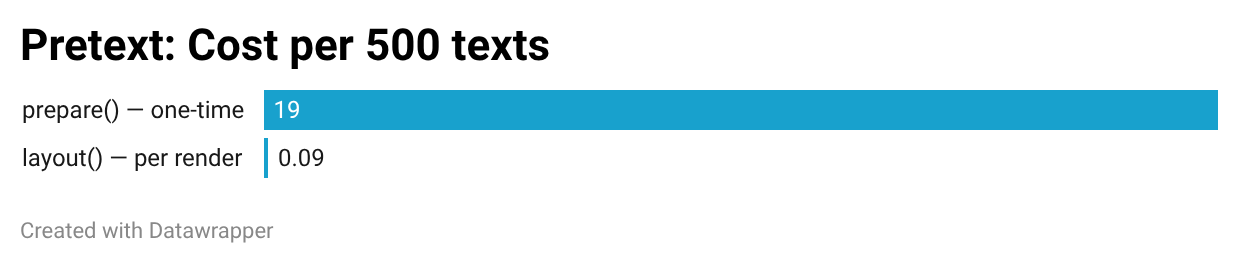
Cost: ~19ms for a batch of 500 texts. Paid once.
Phase 2 — layout() (runs as many times as you need)
const { height, lineCount } = layout(prepared, textWidth, lineHeight)
// pure arithmetic. No DOM layout & reflow!
This is pure math over the cached widths from prepare(). No DOM. No reflow. Just arithmetic.
Cost: ~0.09ms for that same 500-text batch.
That’s a 200x+ speedup on the hot path. Every resize, every container width change, every re-render — takes the fast path.
💡 Image suggestion here: A simple before/after bar chart. Left bar: “DOM measurement — 19ms per batch, every render.” Right bar: “Pretext layout() — 0.09ms per batch after prepare().” This makes the numbers visceral.
The Two Use Cases (And Why One Matters More)
Pretext ships two distinct modes. The community fell in love with the wrong one.
Use Case 1: Measure text height without touching the DOM ✅ The Important One
This is where Pretext changes production web development. You can now predict exactly how tall a block of text will be — before it ever enters the DOM — and render it at the correct position the first time.
import { prepare, layout } from '@chenglou/pretext'

const prepared = prepare(message.text, '16px Inter')
const { height, lineCount } = layout(prepared, containerWidth, 24)

// Now position your DOM text node at the right height.
// The text is a real DOM node — screen readers, copy-paste, find-in-page: all work.
The text still lives in the DOM. The accessibility tree is intact. Users can select it, translate it, search it. You’ve just removed the cost of measuring it.
This unlocks things that were previously painful or impossible:
- Proper virtualization — no guesstimates or over-rendering to figure out which items are in the viewport
- Masonry layouts — height prediction instead of DOM reads
- Chat bubble shrink-wrapping — finding the tightest width that doesn’t change the line count (CSS has no property for this)
- Scroll position anchoring — prevent layout shift when new text loads
- Dev-time button overflow checks — verify labels don’t overflow at build time, browser-free (especially useful with AI-generated UIs)
Use Case 2: Manual line layout for Canvas / SVG / WebGL 🐉 The Viral One
import { prepareWithSegments, layoutWithLines } from '@chenglou/pretext'

const prepared = prepareWithSegments('AGI 春天到了. بدأت الرحلة 🚀', '18px "Helvetica Neue"')
const { lines } = layoutWithLines(prepared, 320, 26)

for (let i = 0; i < lines.length; i++) {
  ctx.fillText(lines[i].text, 0, i * 26)
}
This is the path that made Twitter lose its mind. When you have exact line coordinates, you can paint text onto Canvas, SVG, or WebGL — and do wild things at 60fps.
The advanced routing API — layoutNextLine() — even lets you flow text around obstacles, changing the available width line-by-line:
let cursor = { segmentIndex: 0, graphemeIndex: 0 }
let y = 0

// Lines beside the floated image get less width
while (true) {
  const width = y < image.bottom ? columnWidth - image.width : columnWidth
  const line = layoutNextLine(prepared, cursor, width)
  if (line === null) break
  ctx.fillText(line.text, 0, y)
  cursor = line.end
  y += 26
}
Obstacle-aware text flow. In JavaScript. Without a layout engine. This is genuinely wild.
But here’s the catch: when you paint text to <canvas>, the browser has no idea those pixels represent language. Screen readers skip it. Find-in-page skips it. You can’t select it. You can’t translate it. A <canvas> element is a single tab stop — keyboard users cannot navigate within it. Canvas text rendering has existed for 15+ years. The demos are impressive, but they’re not the breakthrough.
Official Demos
All live at chenglou.me/pretext:
| Demo | What It Shows | Link |
|---|---|---|
| 🫧 Bubbles | Tight chat bubbles shrink-wrapped to optimal width | Open → |
| 🪗 Accordion | Expand/collapse sections with heights from Pretext | Open → |
| 🏗️ Masonry | Card grid with height prediction instead of DOM reads | Open → |
| 📰 Dynamic Layout | Fixed-height editorial spread with obstacle-aware title routing | Open → |
| 🎭 Editorial Engine | Animated orbs + live text reflow, zero DOM measurements | Open → |
| 🔤 Rich Text | Inline code, links, and chips laid out together naturally | Open → |
| 🌀 Variable Typographic ASCII | Proportional measured glyphs vs monospace particle art | Open → |
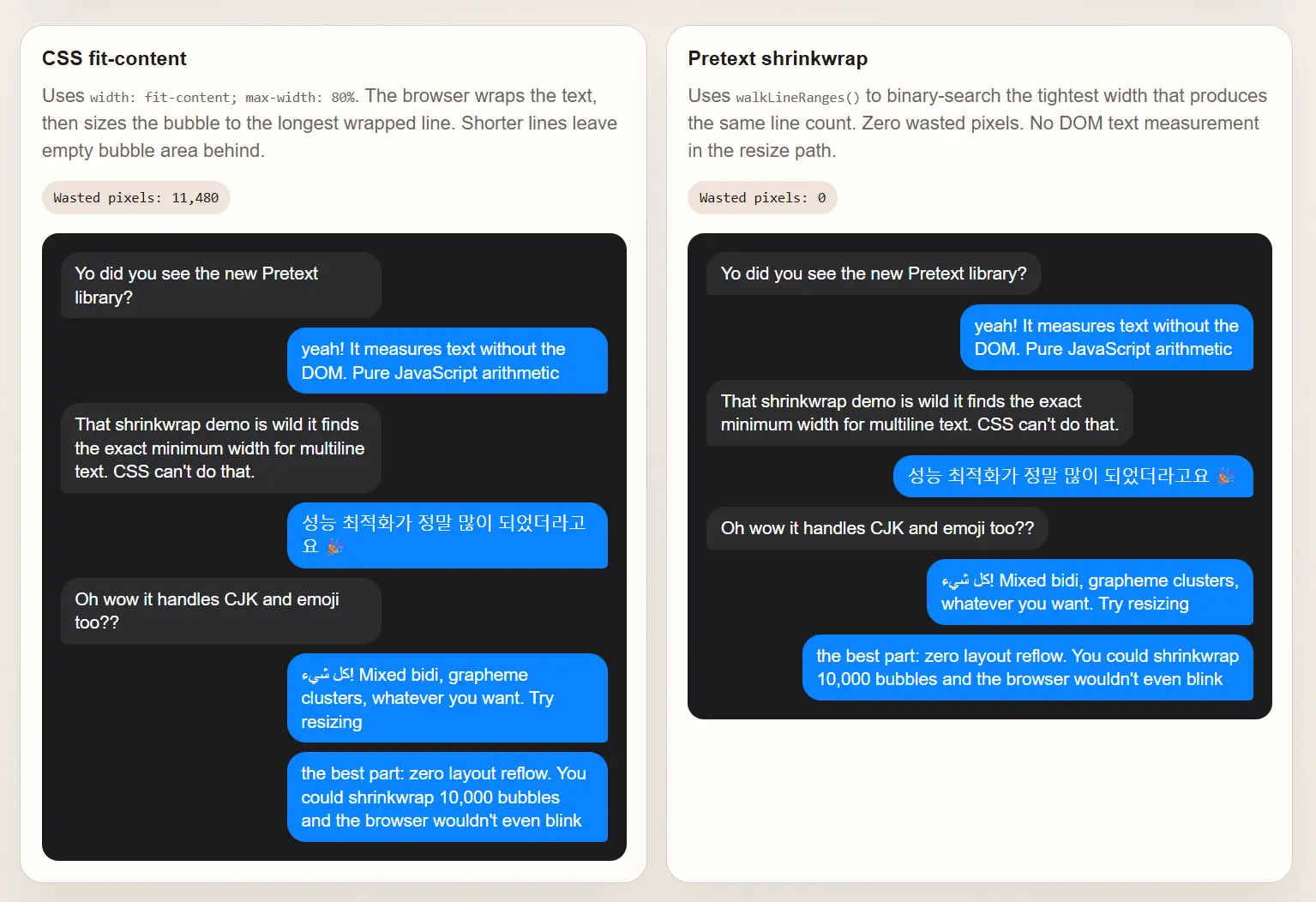 Left: CSS width fit-content — wastes space on short last lines. Right: Pretext walkLineRanges() — tightest fit every time.
Community Demos — The Internet Went Absolutely Wild
The community exploded with experiments within 48 hours of the launch tweet. Here’s everything worth bookmarking, organized by type.
🌊 The Viral Showcase Demos
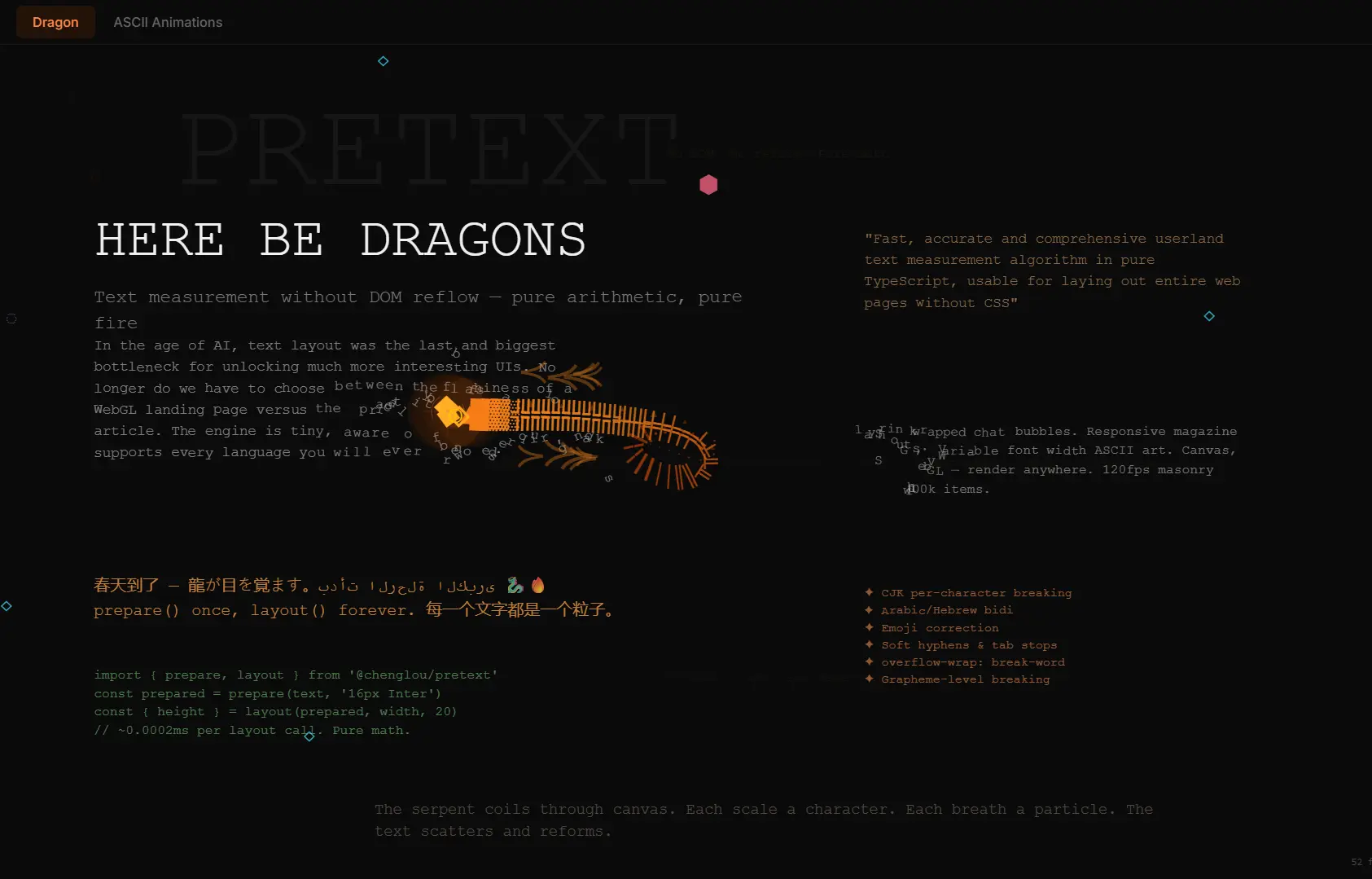
The ones that broke frontend Twitter and started the whole conversation:
| Demo | Link |
|---|---|
| 🐉 Dragon parting text like water | pretext-playground.builderz.dev |
| 💨 Fluid smoke rendered as typographic ASCII | somnai-dreams.github.io → fluid-smoke |
| 🍩 Wireframe torus through a character grid | somnai-dreams.github.io → wireframe-torus |
| 📰 Multi-column editorial with animated orbs at 60fps | somnai-dreams.github.io → editorial-engine |
🧪 Interactive Single Demos & Experiments
| Demo | What It Does | Link |
|---|---|---|
| 🐍 SnakeCase Text | Fun typography play — SnakeCase-style interactive text | snakecase-text.vercel.app |
| 💥 Pretext Breaker | Game-style demo where text breaks and collides like a brick breaker | pretext-breaker.netlify.app |
| 🎨 Splat Editor | Text layout reacts to splat objects; shows both the power and mobile edge cases | pretext-stuff.solarise.dev/splat-editor |
| 📷 Webcam Matrix ASCII | MediaPipe tracks your face, hands, and body as live obstacles — a novel reflows around you in real time | text-reflow.vercel.app |
| ✨ Simple Pretext Demo | Clean, effective demo highlighting improvements over traditional layout | pretext-demo on Replit |
| 🌊 Textflow | Clean interactive textflow demo shared directly in the original thread replies | sebland.com/textflow |
| 🛝 Pretext Playground | Dedicated playground for trying different interactive text effects | unwindkit.com/pretext-playground |
| 🗺️ Soft Cartography | Artistic ASCII abstraction — cartography-style text layout as generative art | hilma-nine.vercel.app → soft-cartography |
🔗 Bonus / Reference
| Resource | What It Is | Link |
|---|---|---|
| 📚 Pretext Weft | Landing page with links to docs, GitHub, and demos index | pretext-weft.vercel.app |
| 🎙️ Kirupa Podcast with Cheng Lou | Deep interview on the thinking behind Pretext — recorded before the launch | youtube.com/watch?v=BfgqoBz8VWw |
| 🐦 Original Launch Thread | 16M views, 53K likes — the tweet that started everything | x.com/_chenglou |
💡 More experiments are dropping hourly — PixiJS/WebGL brick breakers with shaders, physics balls reshaping text, lyric apps, and more. Search
pretext chenglouon X for the latest.
Full API Reference
Use Case 1 — DOM height prediction
prepare(text: string, font: string, options?: { whiteSpace?: 'normal' | 'pre-wrap' }): PreparedText

layout(prepared: PreparedText, maxWidth: number, lineHeight: number): { height: number, lineCount: number }
Use Case 2 — Manual line layout
prepareWithSegments(text, font, options?): PreparedTextWithSegments

// All lines at a fixed width
layoutWithLines(prepared, maxWidth, lineHeight): { height, lineCount, lines: LayoutLine[] }

// Line widths + cursors without building strings (great for binary-searching optimal width)
walkLineRanges(prepared, maxWidth, onLine: (line: LayoutLineRange) => void): number

// One line at a time — width can change per line (for obstacle routing)
layoutNextLine(prepared, start: LayoutCursor, maxWidth): LayoutLine | null
Helpers
clearCache(): void       // release font cache if cycling through many fonts
setLocale(locale?): void // set locale for segmentation (defaults to current)
pre-wrap support for textareas
const prepared = prepare(textareaValue, '16px Inter', { whiteSpace: 'pre-wrap' })
const { height } = layout(prepared, textareaWidth, 20)
// Tabs, spaces, and newlines preserved — exactly like a textarea
Known Caveats
Pretext targets the most common CSS text setup:
white-space: normal | pre-wrap
word-break: normal
overflow-wrap: break-word
line-break: auto
Watch out for:
system-uiis unsafe on macOS — use a named font (Inter,"Helvetica Neue", etc.)- Fonts must be fully loaded before
prepare()runs or measurements will drift - Ligatures and advanced OpenType features can cause small discrepancies
- Not a full font rendering engine — yet
How It Was Built
Cheng Lou didn’t write Pretext manually in the traditional sense. He used an AI-in-the-loop verification workflow — run candidate implementations against ground truth browsers at dozens of widths, languages, and edge cases, then iterate. Arabic RTL alone took significant time. The result is a library that handles real-world text with production-grade accuracy.
The foundation traces back to Sebastian Markbåge’s text-layout research at Meta: canvas measureText for shaping, bidi from pdf.js, streaming line breaking. Pretext takes that decade-old foundation and ships it with full i18n, bidi support, and the two-phase architecture.
The Bottom Line
Linus Ekenstam called it something that “will have implications and ripples in screen UIs for the foreseeable future. Maybe decades.” The launch tweet hit 16 million views in days. The repo is closing in on 20K stars with experiments dropping every hour.
The webcam ASCII field is hypnotic. The physics balls are genuinely unhinged. The dragon is beautiful.
But the library that matters is the one that lets you call two functions, predict text height through pure arithmetic, keep your DOM nodes exactly where they belong, and ship an interface that works for every single user — including the ones on screen readers, keyboard navigation, and translation tools.
Start with prepare() and layout(). The dragons can wait.
All Links:
- 🔗 GitHub: github.com/chenglou/pretext
- 🎮 Official Demos: chenglou.me/pretext
- 🌊 Community Demos: somnai-dreams.github.io/pretext-demos
- 📦 NPM: @chenglou/pretext
- 🐦 Original Tweet: x.com/_chenglou
- 🎙️ Kirupa Podcast: youtube.com/watch?v=BfgqoBz8VWw
- 📖 Dev.to deep-dive: You’re Looking at the Wrong Pretext Demo
- 🏛️ Original research: chenglou/text-layout
Share this insight
Join the conversation and spark new ideas.